Use case · Quotes and takeoffs

Price the job from the plans.Here's how the agent is built.

A plumbing quote starts with a count: every fixture, room by room, and what each one needs from the schedule. Miss one and the number is wrong. The agent builds the rough-in list from the drawings, counts each room once and cites the sheet.

Free to start. No credit card.

The goal

Every fixture, every pipe size.Before the number goes out.

To price the rough-in, an estimator answers four questions. The answers sit on different sheets.

What's in each room?Every fixture tag on the enlarged plans, counted by room.P2.1
What does each one need?Waste, vent, cold and hot water sizes from the connection schedule.P0.0
Is anything counted twice?The same room drawn in more than one view on the same sheet.P2.1
What's scheduled but not drawn?A fixture on the schedule that no plan shows, so the scope gets confirmed before pricing.P0.0 · P2.1

Today someone counts tags off the plans and keys them into a spreadsheet. The agent counts from the table and cites the sheet.

Data sources

The whole set, one data source.

The Parkland Library Expansion permit set is 97 sheets in eight PDFs: general and civil, architectural, structural, mechanical, electrical and plumbing. All eight go into one data source, so the plumbing sheets sit next to everything they refer to.

  • Create a data source.
  • Upload the PDFs as they came.
  • Start ingestion.

At scaleEvery set you price, each in its own project folder, in one data source. Built for millions of documents.

Datasource metadataIn the docs
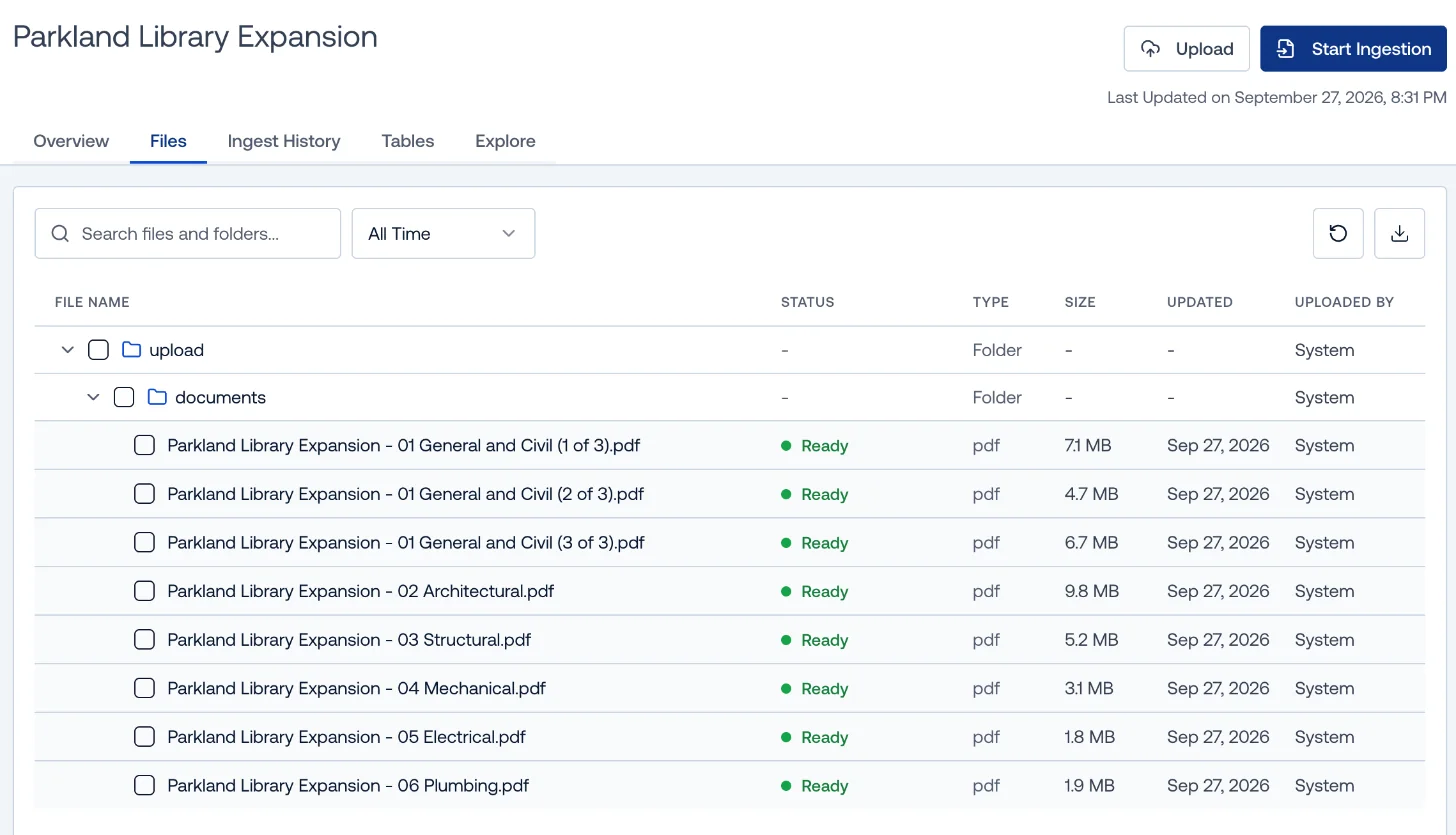
The Parkland Library Expansion data source in Meibel with eight PDFs, from 01 General and Civil to 06 Plumbing, each marked Ready.

Parse

A schedule on a drawing comes back as a table.

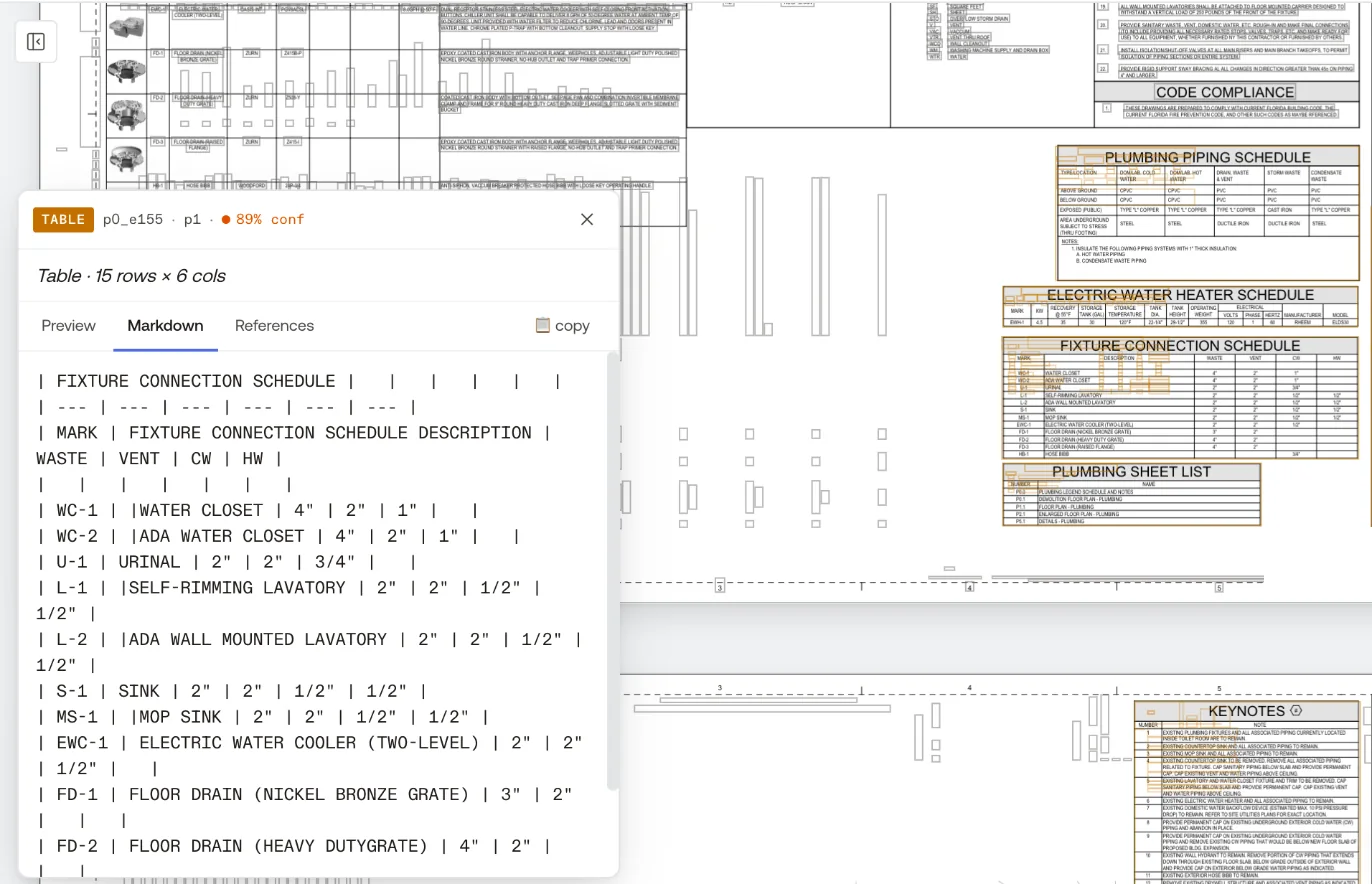
Ingestion parses every sheet. P0.0 carries five schedules side by side. Meibel finds the fixture connection schedule as its own table, 15 rows by 6 columns: every fixture mark with its waste, vent, cold and hot water sizes.

  • Nothing to configure.
  • Open any sheet to see each element and what was read from it.

At scaleEvery sheet of every set is parsed the same way, scanned pages included. No template per engineer or format.

Charts, formulas and vision modelsIn the docs
Sheet P0.0 of the Parkland plumbing set in Meibel, with the fixture connection schedule read as a table of 15 rows by 6 columns: WC-1 water closet 4 inch waste, 2 inch vent, 1 inch cold water, and the rest of the fixtures.

Schema

One row per fixture, per room, per view.

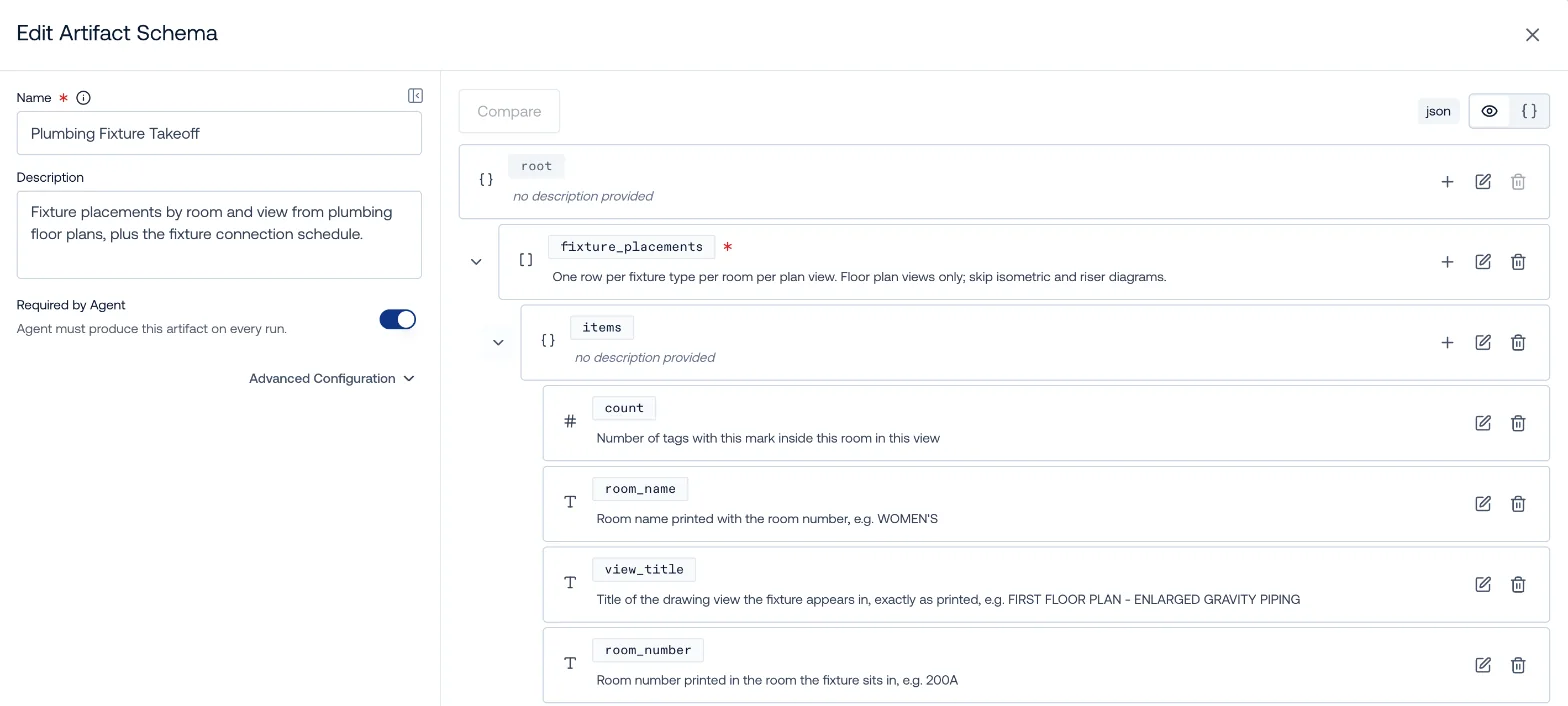
The takeoff has two lists. Fixture placements: the sheet, the view, the room, the fixture mark and the count. Fixture connections: each mark with its waste, vent, cold water and hot water sizes. The fixture mark joins the two.

  • Say what one row means in each field description.
  • Keep the view title, so a room drawn twice can be counted once.

At scaleOne schema for every set. A new job fills the same two lists, in the same table.

Tip"One row per fixture type per room per plan view" is what lets the agent count a room drawn twice only once.

Prompts and schemasIn the docs
The Plumbing Fixture Takeoff schema in Meibel, required by the agent, with fixture_placements described as one row per fixture type per room per plan view, and fields for count, room_name, view_title and room_number.

Extract

The extractor reads one drawing set at a time.

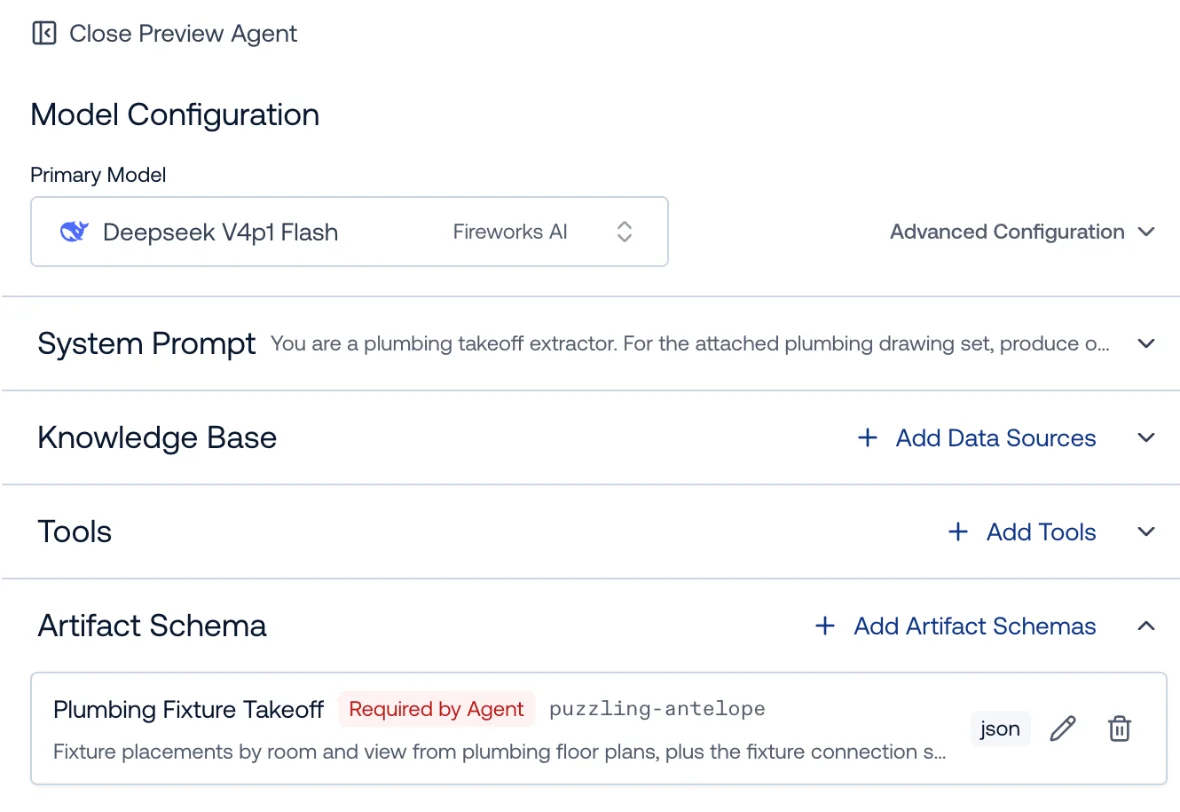
An extractor is an agent with the schema switched on as required and no data sources attached. It reads only the document it's given and returns one takeoff.

  • Attach the schema and mark it required.
  • Leave the knowledge base empty.
  • Pick a fast model. This one runs DeepSeek V4p1 Flash.

At scaleBecause it reads one document at a time, it runs in parallel across as many sets as you load.

AgentsIn the docs
The Plumbing Takeoff Extractor in the Meibel Agent Builder: DeepSeek V4p1 Flash, an empty knowledge base, and the Plumbing Fixture Takeoff schema marked Required by Agent.

Batch

Run every PDF into one table.

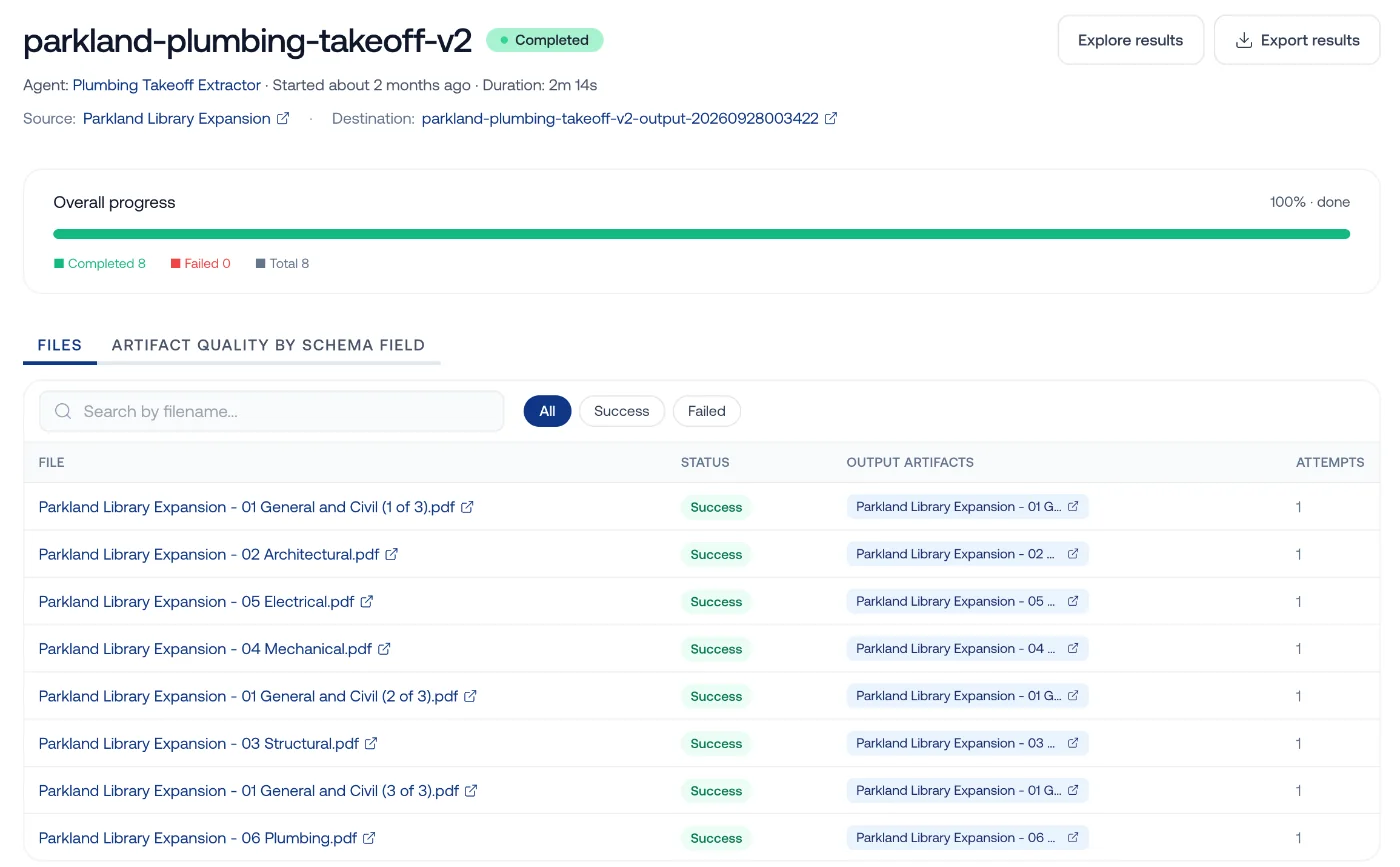
A batch runs the published extractor once per file and writes every row into the takeoff table. Here: 8 of 8 files in 2 minutes 14 seconds, none failed.

  • Choose the extractor and the documents data source.
  • Write every set into the same table.
  • Open any record from the results.

At scaleA new job is its documents plus one batch, run in parallel. Refine it on one document. Run it on millions.

Batch jobsIn the docs
The parkland-plumbing-takeoff-v2 batch in Meibel: completed, 8 of 8 files, from the Parkland Library Expansion data source into the takeoff output, every file marked Success.

Multiple data sources

Give the agent both.

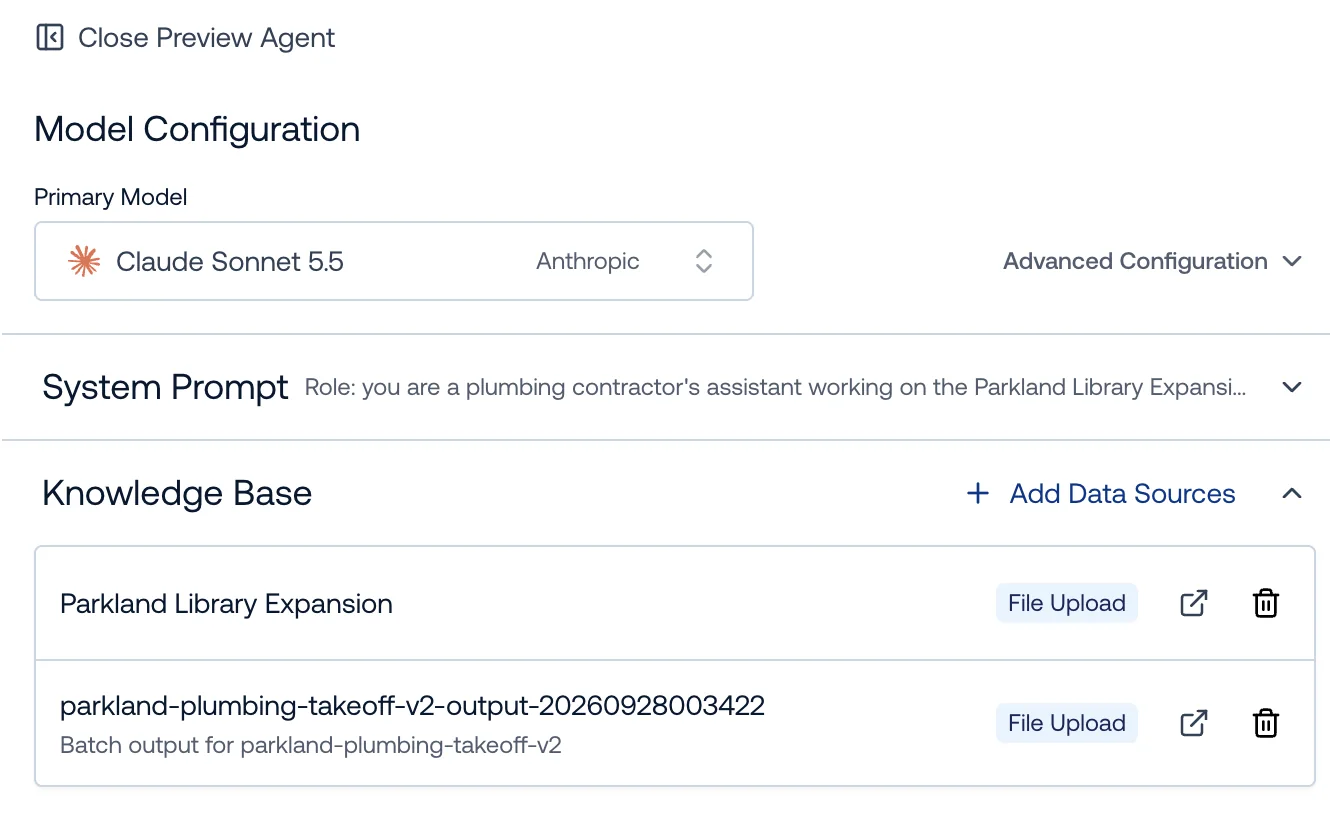
The table answers how many and where: every fixture by room, with its pipe sizes. The documents answer what a sheet says: a note, a code table, a detail. A count is a query across rows, not a search.

  • Attach both in the knowledge base.
  • Tell the agent to take quantities from the table and to use one view per room.

At scaleMany agents can read the same takeoff without reloading the files: a rough-in list, a material order, an estimating assistant.

Building agentsIn the docs
The Plumbing Rough In Agent in the Meibel Agent Builder: Claude Sonnet 5.5 with two data sources in its knowledge base, Parkland Library Expansion and the plumbing takeoff batch output.

Confidence scoring

Choose what every answer is scored on.

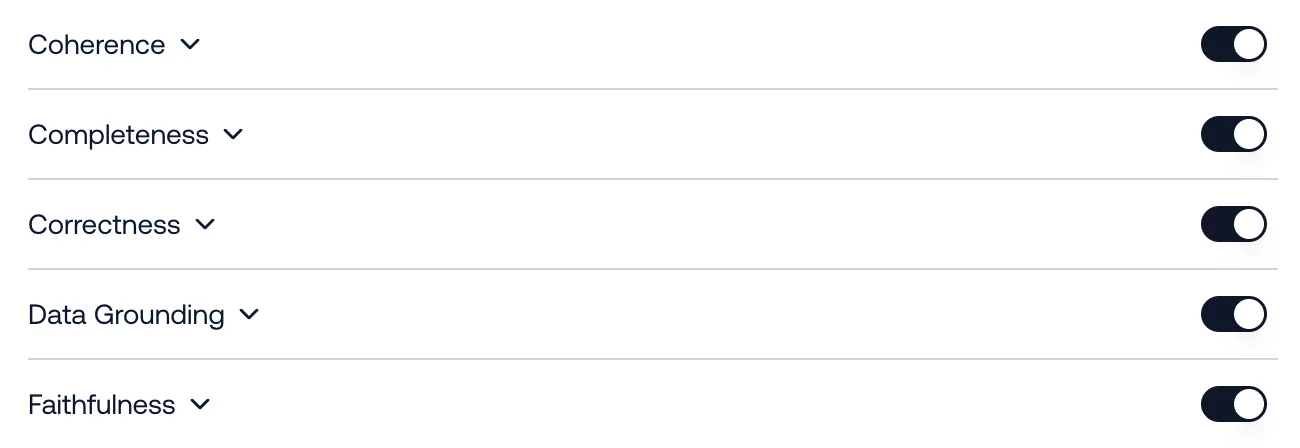
This agent is scored on coherence, completeness, correctness, grounding in its data and faithfulness, among others. You choose the checks, and you decide what a low score triggers.

  • Switch on the checks that matter before a number goes out.
  • Read the scores on every answer in chat, the API or a batch.

At scaleEvery answer is scored, so at volume your team reads the low scores, not every sheet.

Confidence scoringIn the docs
Evaluation checks in the Meibel Agent Builder with Coherence, Completeness, Correctness, Data Grounding and Faithfulness switched on.

Ask it

Six fixtures in Women's 200A.Counted once, sized from the schedule.

One question to the agent, answered with each fixture, its pipe sizes and the sheets they came from.

Plumbing Rough In AgentData grounding 0.86

Build the rough-in list for Women's 200A.

Women's 200A: 6 fixtures (3 water closets, 3 lavatories).

MarkQtyWasteVentCWHW
WC-1 Water closet24"2"1"–
WC-2 ADA water closet14"2"1"–
L-1 Self-rimming lavatory22"2"1/2"1/2"
L-2 ADA wall-mounted lavatory12"2"1/2"1/2"

Sources: P2.1 (enlarged gravity piping view, for quantities), P0.0 (fixture connection schedule, for sizes), LS1.1 (cross-check)

FlagI used the P2.1 gravity piping view for the counts. The pressure piping view shows the same quantities, and I did not add the two views together.

1 of 2 flags shown

It answers the next questions the same way

Where is the drinking fountain, and what does its rough-in need?One EWC-1 in the corridor on P2.1: 2" waste, 2" vent, 1/2" cold water. It flags that only one view shows it, so the tie-in gets checked on the plan.
Which fixtures on this job need hot water?Six lavatories, three in each restroom, all at 1/2". It flags the sink and mop sink: scheduled with hot water, but not in the takeoff, so confirm the scope.
What if the room isn't on the plans?Asked for a staff break room, it finds no fixtures in the takeoff, names the three rooms that have them and asks which one you meant.

Run it at scale

Refine it on one room.Run it on every set you price.

This build is small on purpose. At volume every step stays the same: more sets in the data source, the same schema and extractor, the same batch, and one agent for every job.

In this buildAt scale
DocumentsOne public permit set, 97 sheets in 8 PDFsEvery set you price, every trade, every revision
ExtractionOne batch, 8 of 8 succeededThe same schema and extractor on every new set, in parallel
AgentsOne rough-in agentMany agents on the same takeoff: rough-in lists, material orders, estimating questions
QuestionsOne room, one setEvery room on every job, in a batch or as an MCP tool

Make it yours

Swap in your sets.Keep the steps.

Your documentsYour drawings, schedules and specs, for any trade you price.
Your recordAdd the fields your estimate needs, such as fixture models or carrier types.
Your measureRun a job you've already taken off. Compare the counts room by room, and the time per set.

Try Meibel

Build the takeoff agent.Start with a job you've already priced.

Load one set, shape the takeoff and ask for a room.

  • Schedules read as tables.
  • Same steps for one set or millions of documents.
  • Rooms drawn twice, counted once.
  • Every answer scored and sourced.

Questions

What estimators ask first.

Why not just ask the agent to count from the drawings?

Counting from retrieved text misses rooms and double counts views. The takeoff table turns a count into a query across rows instead of a reread of the plans.

How many documents can it handle?

It's built for millions of documents. Batches run in parallel, and every new set goes through the same schema and extractor, into the same table.

Does it work for other trades?

Yes. Change the schema to the marks and schedules your trade prices, such as electrical devices or mechanical equipment, and keep the steps.

Can it read our specs too?

Yes. Spec books, addenda and submittals go in the same data source. The agent can check a fixture against its spec section as well as its schedule.

How do I know an answer is right?

Every answer cites the sheet and the schedule, and is scored on the checks you choose. You decide what a low score triggers.

PALETTE