Data · Data Explorer
See what's in your data.Turn it into a policy.
Browse every document and table in a data source. Filter it, and the filter becomes the boundary your agents run inside.
execution_policy
  supplier in [Acme Coatings,
               Harbor Paints]
  region = West
  → 418 documents in scope
Before it goes live
What can this agent see?
Answer before it runs.
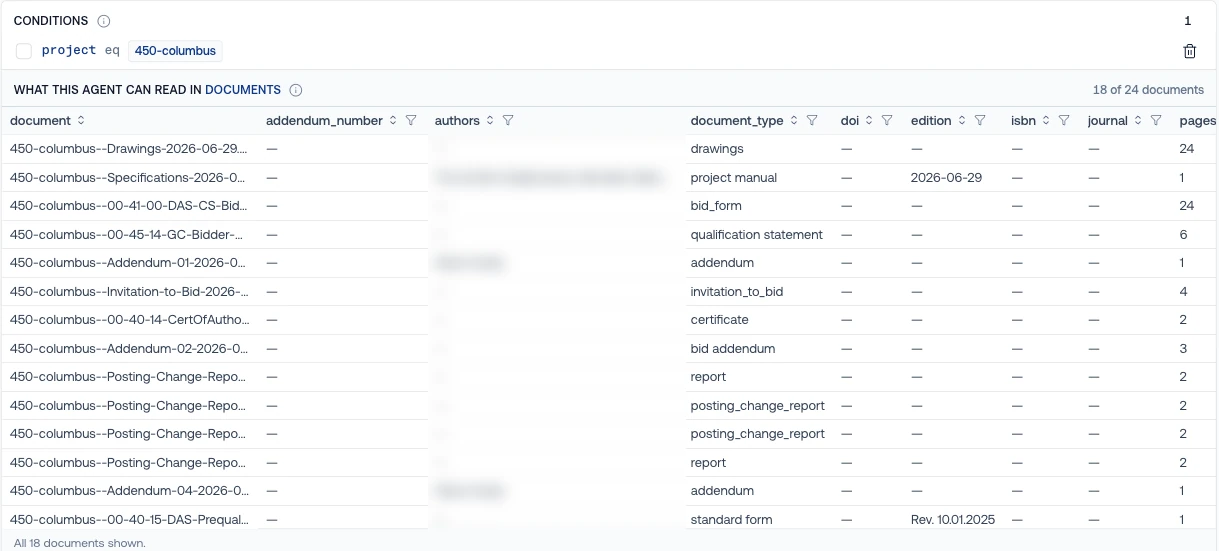
Before an agent goes live, someone always asks what it can reach. Data Explorer lets you answer with the data itself, not with a prompt.
 12
- 1
The condition you set.
One line, on a field already in your data. No prompt to word carefully.
- 2
Exactly what it can read.
18 of 24 documents, listed by name, before the agent runs once.
Real console · sample project · public bid documents
What you see
Everything in a data source.
Before any agent sees it.
Every indexed field with its values and counts, the pieces your agents will search, and every table and column pulled from your documents.
SAMPLE PROJECT · SAMPLE VALUES
From filter to policy
The view you build
is the boundary it runs in.
Scope by what's actually in the data. The metadata you index is what you scope on, so there are no separate rules to keep in sync.
 12
 3
- 1
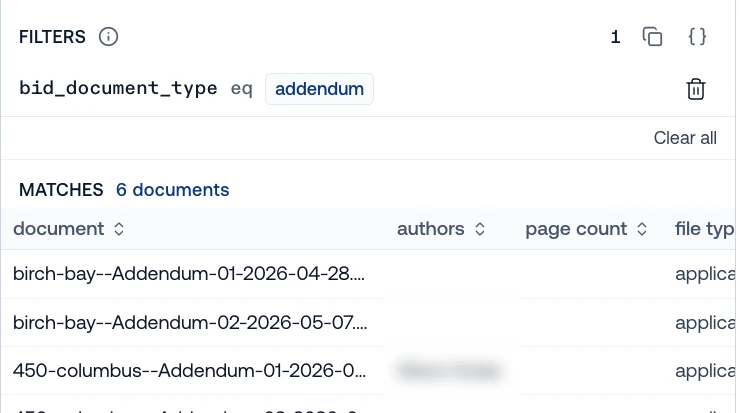
Filter on a field you indexed.
Supplier, region, document type. Here: addendum.
- 2
See exactly what matches.
6 documents, listed by name, before any agent runs.
- 3
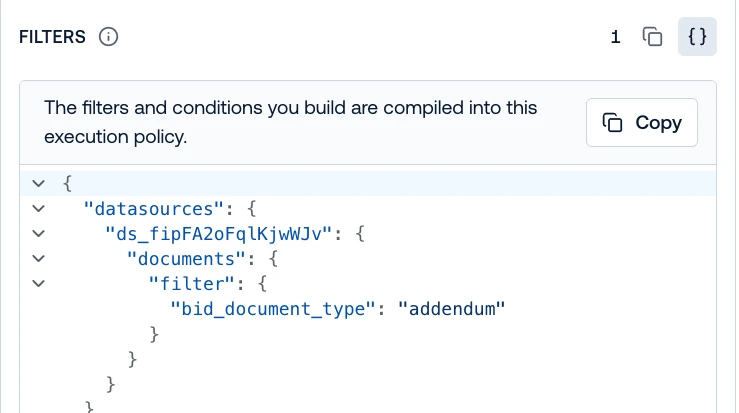
It compiles into a policy.
Attach it to an agent. Hardrails enforces it on every search, query and tool call.
REAL CONSOLE · SAMPLE PROJECT · PUBLIC BID DOCUMENTS · HOW HARDRAILS WORK →
Browse your own documents as data.
Upload a folder, filter it, and give an agent only what the filter shows.
Check before you scope
Spot it before an agent does.
Low-scored pages, empty columns and duplicate revisions show up in the data, not in an agent's answer three weeks later.
SAMPLE PROJECT · SAMPLE VALUES
Answer the audit
Know what every agent could see.
Prove it later.
When someone asks what an agent could reach on a given day, show them the policy and the data it covered, not a prompt and a guess.
ILLUSTRATION · SAMPLE PROJECT
How it connects
Between the data and the agent.
Explorer is where the data you built becomes the scope your agents run in.
At work across industries
Scope every agent by what's in the data.
Built for any document-heavy work. Here's what it does in a few industries.
One bid per session
One agent answers on any bid, scoped to a single project for each session.
One jurisdiction
Scope a tariff agent to one state's schedules, so it never quotes another's.
One plan year
Scope a benefits agent to the plan and year a member is in.
One regulator
Scope a label agent to one market's documents when the question is about that market.
Built on Meibel
Teams already ship on it.
Meibel is a foundational technology for our Generative AI practice. Our customers demand accountability and transparency from AI solutions, along with seamless integration into their existing operations and workflows. Meibel's platform delivers on all fronts.
Meibel’s Generative AI Platform allows FAST, along with our subordinate Supporting Effort, to expand the scope of US Army projects we are bidding on. We now deliver AI within our solutions that opens new opportunities, ensuring the military of the transparency, accountability and confidence they require.
Questions
What is Data Explorer?
The Explore view of a data source in the Meibel console. It shows every indexed field with its values and counts, the chunks your agents search, and every extracted table and column.
How does a filter become a policy?
The filters and conditions you build compile into an execution policy. Attach the policy to an agent, and Hardrails enforces it on every search, query and tool call.
What can I filter on?
The metadata fields you index when documents come in: supplier, region, document type, or any field you define.
Can I write policies without the console?
Yes. Execution policies are also available through the API.
Start with one workload. Scale efficiently.
See what's in your data before an agent does.
Sign up free, connect a data source and open Explore. Then turn the view into a policy.