

In our last post, we described the wall every document processing team hits: one pipeline per document type, one model per attribute, a rebuild every time a format changes. We described how Meibel's Document Intelligence works differently.
This post goes deeper on the mechanism behind it: zero-shot document processing.
The term gets used loosely in AI. Here is what it means at Meibel, how the pipeline actually works, and why it matters for teams processing documents at scale.
Zero-shot means: we did not train anything on your document type, we did not build a template, and we did not need to know your industry. One pass over the document, and the pipeline gets everything.
Specifically:
This is the single most important concept we teach in customer conversations, because most buyers walk in assuming the opposite. They assume document processing requires a template, a training set, or a custom model per document type. That assumption shaped the industry for years. It is no longer the constraint.
This is not a theoretical objection. It shows up in nearly every discovery call, across industries:
The assumption is understandable. For years, document automation did mean a template or a trained model per type. These buyers are not wrong about history. They are wrong about what is possible now.
Zero-shot does not mean "no intelligence." It means the intelligence is in the pipeline, not in per-document-type configuration. Here is what happens when a document enters Meibel:
The pipeline identifies the file type and selects the processing path. Digital PDFs, scanned PDFs, image files, office documents, and container files (ZIP, TAR, EML) each have their own handling. Mixed PDFs, where some pages carry a text layer and others are scanned, are decided page by page in a single pass.
There is no separate endpoint for scanned input. No special flag. Submit the file, and the platform figures it out.
Purpose-built models analyze the visual structure of each page. This is where the pipeline identifies what each region of the page actually is: titles, section headers, paragraphs, tables, images, lists, formulas, page headers and footers.
This matters because most extraction tools skip this step entirely. They treat the document as a bag of text. The result: a table rendered as a paragraph, a two-column layout read straight across, a chart treated as decoration.
Layout analysis also recovers the heading hierarchy. Heading levels (H1 through H6) are derived from the document's own typography by clustering font sizes and weights. This means the section structure survives into the output without a separate pass.
The pipeline sequences content the way a person reads the page. Multi-column layouts, text that wraps around images, footnotes that belong at the bottom of a section rather than inline. The output arrives already ordered, so downstream systems do not need to reconstruct the reading flow from raw coordinates.
Tables are not flattened into text. The pipeline recovers rows, columns, spanning cells, and cell relationships. A table element carries a grid of cells you can address by row and column, with each cell knowing its position and span. This is what makes tables queryable downstream, rather than requiring a human to reconstruct the structure from a paragraph of numbers.
For scanned pages, image-only PDFs, and photographed documents, OCR runs automatically. Three things happen:
The result: a scanned document returns the same typed, positioned elements as a digital one. Your code does not branch on whether the source was scanned.
Not every image in a document is the same. A chart is data. A photograph is context. A diagram is structure. A table rendered as an image is structured data trapped in pixels.
The pipeline classifies each image by type and routes it to the right processing path:
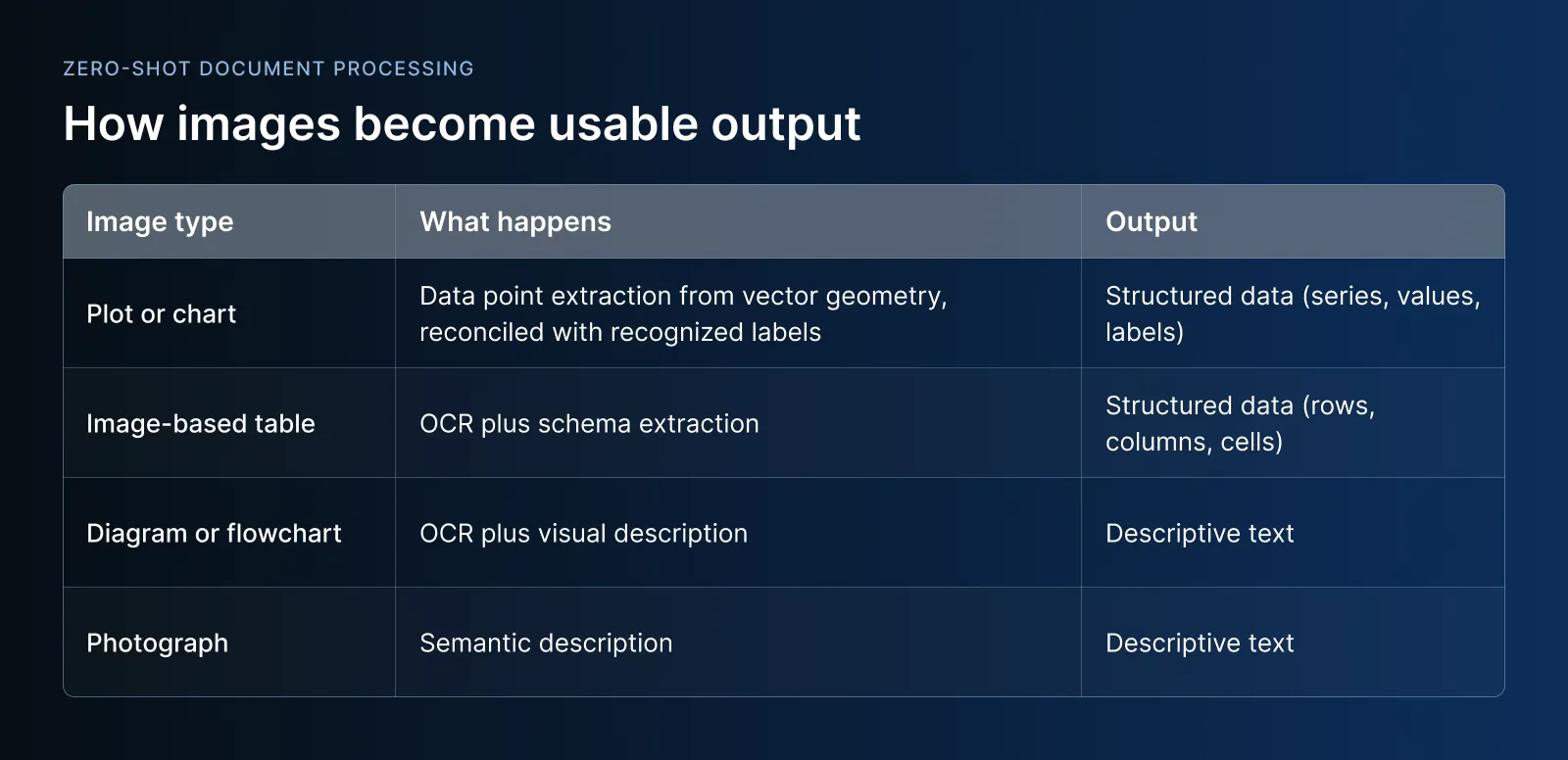
Some regions resist ordinary text recognition. A formula is mathematical notation, not a line of words. A seal is stylized text arranged in a circle. A chart encodes meaning in geometry and labels. For these, the pipeline routes the region to a vision-language model suited to the task. The result is merged back into the element, so formulas render as equations, seals yield their text, and charts yield their data.
A page with none of these regions passes straight through without contacting a vision model. Plain text and tables pay nothing for this stage.
Every element carries a confidence score. The document carries an overall summary. These scores vary with the source: a clean digital table scores higher than a scanned one, text read from the document's own text layer scores higher than text recovered by OCR.
Because the score sits on the element, a downstream step can act at the level of a single table or paragraph: flag what needs review, trust the rest. Confidence-based routing automates high-confidence results and escalates low-confidence ones for human review.
Every element carries a bounding box locating it on the page. This is what connects extracted content back to the source. A value pulled from a table can be traced to the region it was read from. A passage can be highlighted on a rendered page. A reviewer can see a low-confidence extraction in its original context.
This is not metadata bolted on after the fact. Position is part of the model from the start, and it underlies reading order, confidence, and every downstream use.
Two clarifications, because these come up:
"Zero-shot" does not mean "no models are involved." The parse stage uses purpose-built models for layout detection, table structure recognition, reading order, and OCR. These models are trained on broad document understanding tasks, not on your specific document types. They do not need to see your documents to work on them.
"Zero-shot" does not mean "no LLMs are involved." The parse stage does not use LLMs. But when you move from parsing to schema-constrained extraction (defining the specific fields you want out of the document), extraction is model-agnostic and customers bring their own model keys. The distinction matters: parsing uses purpose-built models, extraction uses schema-constrained LLM calls. Neither requires training on your documents.
The cost of the old approach is not abstract. It is specific and measurable:
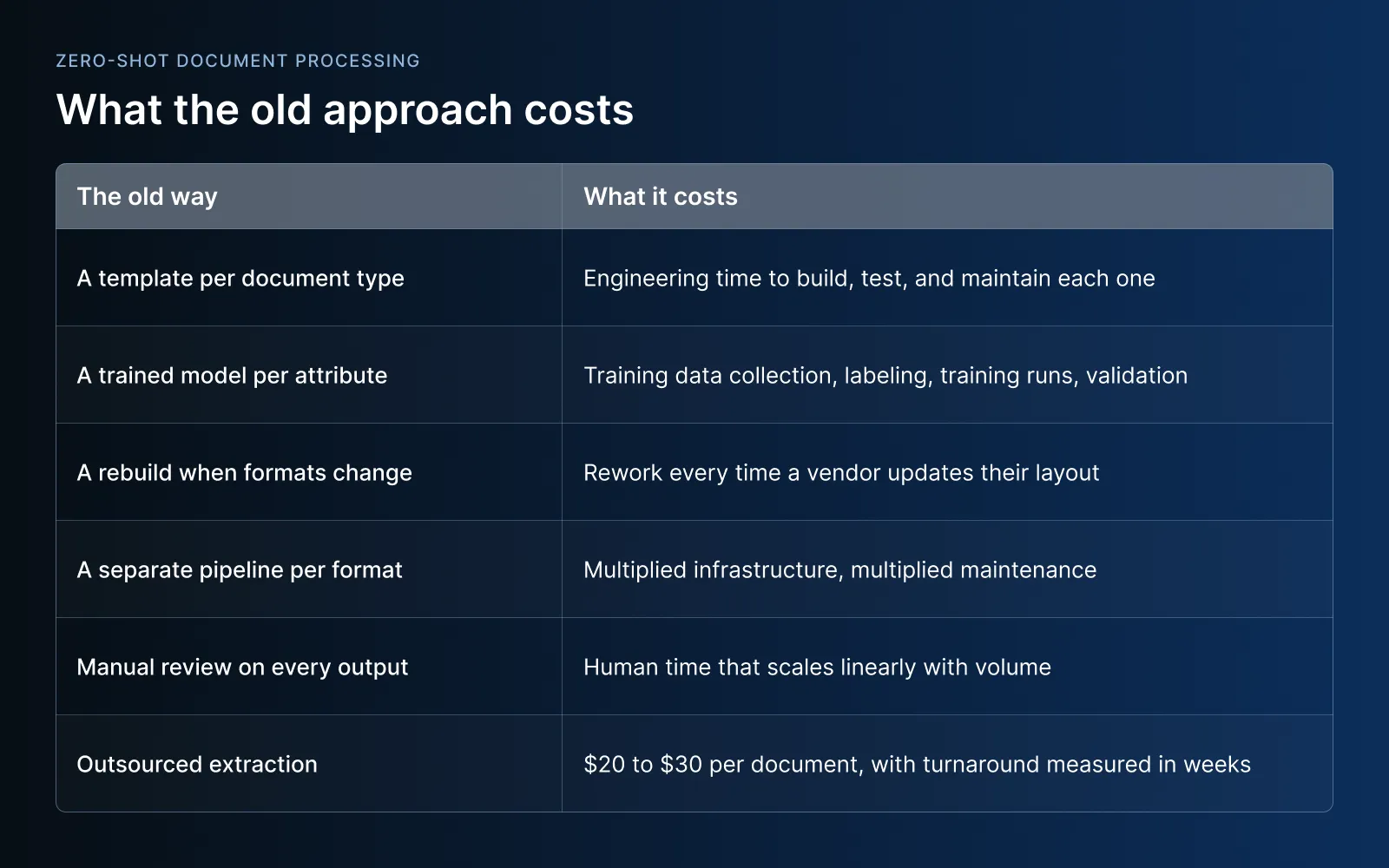
Zero-shot processing replaces all of this with one pipeline. Define the output shape once. Run it against everything. The first document you process is a real job, not a training project.
One customer went from three minutes per document to seven seconds. Another went from a 3% extraction success rate across 10,000 documents to reliable extraction at scale. A Fortune 200 manufacturer uses it to extract safety-critical chemical data where, in their words, "minor errors can be severe" legal liabilities.
Zero-shot parsing is the foundation. Every later step compounds on it.
Once a document is parsed with structure preserved, it becomes the input for everything else:
Documents become data. Data becomes agents. Parsing is step 1, and every later step depends on it.
If the parse is wrong, everything downstream is wrong. If the parse loses structure, nothing downstream can recover it. If the parse requires a training project before it starts, you are weeks or months from value instead of minutes.
That is why zero-shot matters. Not as a buzzword, but as the mechanism that removes the training project standing between your team and the data locked in your documents.
If you are evaluating document processing tools, here is the test:
If the answer is yes, you are looking at zero-shot document processing.
If the answer is "we need 50 labeled examples first," you are looking at the old way.
Ready to build your first AI agent with Meibel? Sign up free, upload your documents and enable your first agentic workflow with confidence scoring & source tracing.


Kevin McGrath is the Co-Founder and CEO of Meibel, bringing over 20 years of experience in cloud infrastructure and platform engineering. He previously served as Vice President and General Manager at Spot by NetApp (2022-2024), where he led a global organization of over 1,000 people, and held roles as Chief Technology Officer and VP of Architecture at Spot (2017-2022). He holds AWS Certified Solutions Architect (Professional), AWS Certified DevOps Engineer (Professional), and earned his BA in Economics and Master's in Computer/Information Technology Administration from University of Maryland.
REQUEST A DEMO
See how Meibel delivers the three Cs for AI systems that need to work at scale.